Parachord is about removing friction between you and your music. Our (optional!) AI assistant Shuffleupagus - powered by any one of a number of AI plug-ins - takes that further… you can generate playlists, get recommendations, ask for details about what’s currently playing, see what your friends have been listening to, and control playback, all through natural language conversation right inside the app.

But what if you’re not in Parachord? What if you’re already deep in a conversation with Claude or ChatGPT, working on something else, and want to control your music without switching apps?
That’s why we’ve built an MCP server into Parachord.
What is MCP?
MCP (Model Context Protocol) is an open standard that allows AI models to connect with external tools, data sources, and services. Think of it as a universal adapter that lets AI assistants like Claude, ChatGPT, or others reach beyond their chat interface and actually do things in the real world.
Instead of AI being limited to generating text responses, MCP enables AI to:
- Query databases and APIs
- Control applications
- Access local files and services
- Perform actions on your behalf
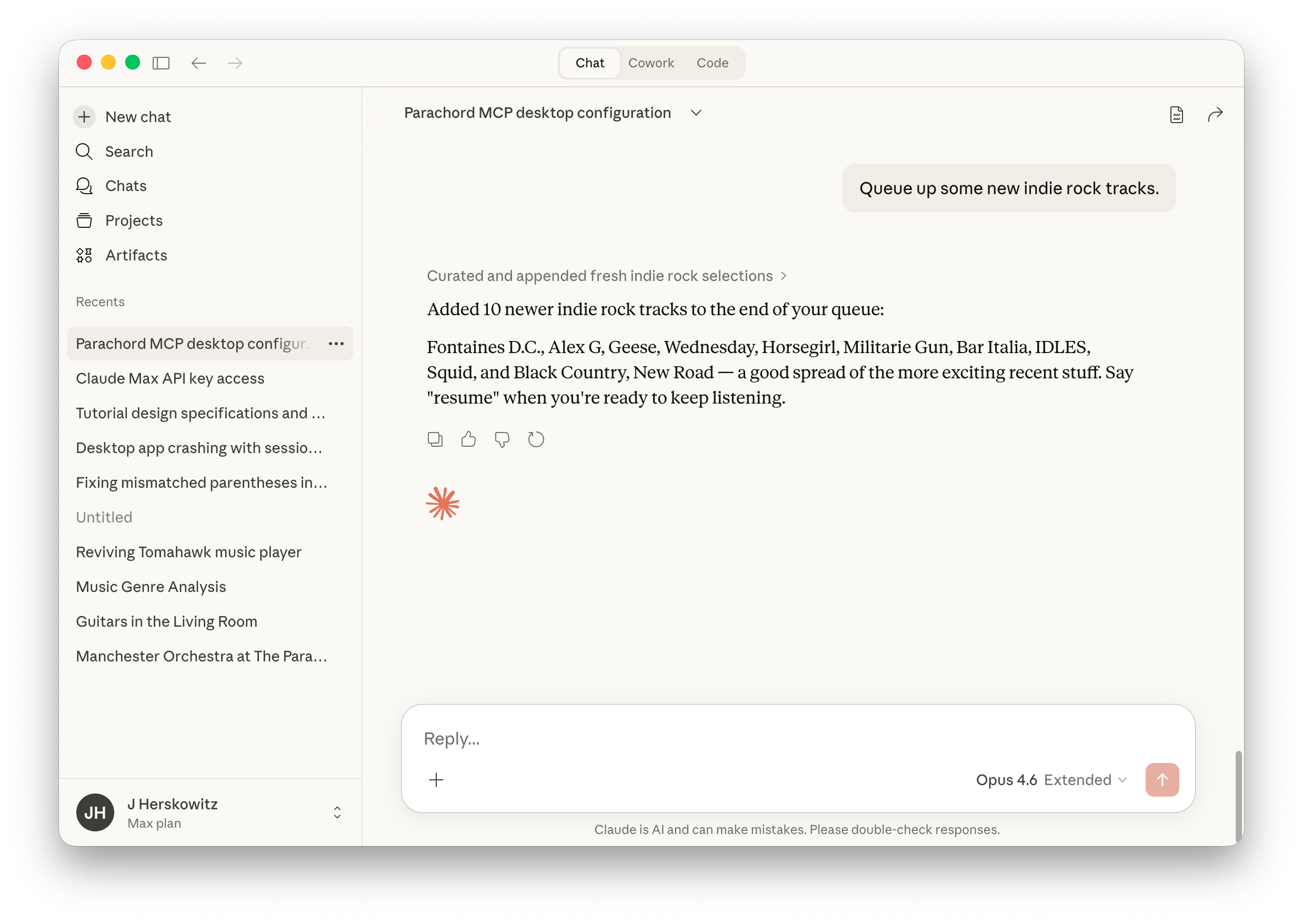
It’s the difference between an AI that can tell you how to create a playlist and one that can actually create it.
Bringing Shuffleupagus Capabilities to Any AI
With our MCP server, any MCP-compatible AI assistant can now do what Shuffleupagus does—but from outside Parachord:
- Search your library - “Find all the jazz albums I’ve collected”
- Create playlists - “Make me a playlist of upbeat songs for running”
- Control playback - “Play something relaxing” or “Skip this track”
- Get recommendations - “What should I listen to based on my recent plays?”
- Import music - “Add this album to my collection”
- Query across sources - “Do I have this song on any of my services?”
The AI has access to the same resolution pipeline that powers Parachord itself. When it creates a playlist, those tracks get resolved across all your configured sources just like anything else in your library.
Think of it this way:
- Shuffleupagus: You’re in Parachord, using AI plug-ins to interact with your music
- MCP: You’re in an external AI tool, and it controls Parachord for you
They’re complementary. Use Shuffleupagus when you’re actively in Parachord. Use MCP when you want your AI assistant to manage music as part of a larger workflow without leaving your conversation.
How It Works
Parachord’s MCP server exposes a set of tools that AI assistants can call:
| Tool | What it does |
|---|---|
search |
Search your library by artist, album, track, or any combination |
play |
Start playback of a track, album, or playlist |
pause / resume |
Control playback state |
skip |
Move to the next track |
queue |
Add tracks to your play queue |
create_playlist |
Build a new playlist from criteria |
get_now_playing |
See what’s currently playing |
get_recommendations |
Get suggestions based on your listening history |
When you ask your AI “play some chill music,” here’s what happens:
- The AI interprets your intent
- It calls the
searchtool with appropriate parameters - Parachord returns matching tracks from your library
- The AI calls
playorqueuewith the results - Music starts playing
All of this happens in seconds, and you never leave your conversation.
Setting It Up
If you’re running Parachord, the MCP server is enabled by default on localhost:9421. To connect your external AI assistant:
- Open your AI client’s MCP configuration
- Add Parachord as a server with the local endpoint
- Start asking for music
For example, for Claude Desktop users, add this to your claude_desktop_config.json:
{
  "mcpServers": {
    "parachord": {
      "url": "http://localhost:9421/mcp"
    }
  }
}
That’s it. Your AI clients can now control your music on your desktop for you.
Why This Matters
We built Parachord to remove friction from how you interact with music. You shouldn’t have to think about where your music lives or manage multiple apps. MCP extends this philosophy to how you interact with your music.
Natural language is often the fastest way to express what you want. “Play that album we listened to at the party last month” is way faster than navigating through menus and search results—assuming your AI knows your library and can actually take action.
This also opens up interesting compositional possibilities. Your AI can combine Parachord with other MCP-enabled tools. Imagine: “Check my calendar, and if I have focus time blocked, start my concentration playlist.” The AI orchestrates multiple services to serve your intent.
Privacy Notes
The MCP server runs locally on your machine. Your music library data doesn’t leave your computer unless you explicitly choose a cloud-hosted AI service (e.g. ChatGPT, Gemini, Claude). When using local AI models (like the Ollama plug-in), everything stays on-device.
For cloud AI services, the data necessary to fulfill your request gets sent—this includes search queries, track metadata, and listening history when asking for recommendations. Audio files themselves are never transmitted.
What’s Next
We’re excited to see what people build with this. If you create something cool with Parachord’s MCP server, let us know in the forum.
MCP support is available in Parachord 0.6.0 and later. Download Parachord to get started.