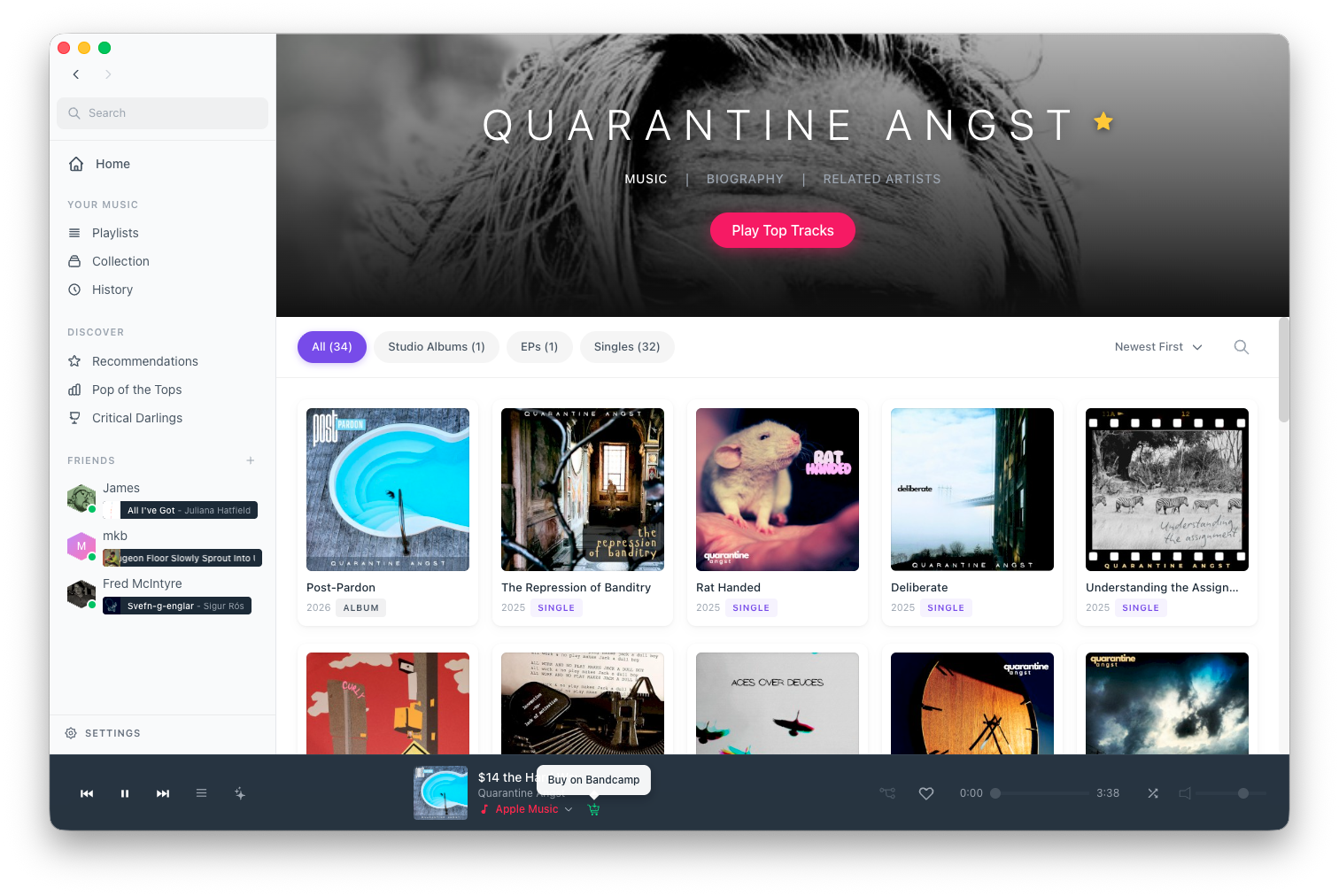
One of the best ways to support the artists you love is to actually buy the music you discover and stream in Parachord. Today, we extended the plug-in architecture to easily buy tracks and albums easily from within the app - no matter what source it is playing back from.
Why This Matters
Parachord is about giving you control over your music experience. Our plugin system lets you stream from Spotify, YouTube, Bandcamp, and more—all in one unified interface. But streaming isn’t always the answer - nor are streaming and downloads mutually exclusive.
Sometimes you want to:
- Own your music, not rent it
- Support artists directly with a purchase that puts more money in their pockets
- Keep music forever, even if a streaming service removes it
- Get the highest quality files available (FLAC, WAV, hi-res)
- Play offline without worrying about DRM or subscription status
Purchase Download makes all of this possible without leaving Parachord.
How It Works
The Buy Button
When you’re playing a song, you’ll now see a Buy button alongside the usual play controls—but only when a purchase option is available. Here’s the logic:
Track/Album View
       ↓
  Query Purchase-Enabled Plugins
       ↓
  ┌────┴────┬────────────┐
  ↓         ↓            ↓
Bandcamp  Qobuz     7digital
  ↓         ↓            ↓
  └────┬────┴────────────┘
       ↓
  Aggregate Pricing & Formats
       ↓
  Display Buy Button (if available)
Clicking the Buy button opens a browser directly to the storefront that offers all of their available options: what formats they offer, and at what price. You pick the one you want, complete the purchase through the store’s secure checkout, and Parachord handles the rest.
Seamless Download Integration
After purchase, the downloaded files automatically appear in your local library (pending the appropriate watch folders are set up). No hunting through your Downloads folder, no manual importing. Parachord:
- Detects the completed download to your configured music directory
- Applies proper metadata and album art (if missing)
- Updates your Collection index
- Then uses your resolver priority settings to determine when to play the local fine vs. stream it
That last point is key - and subject to preference both of the user and the artist. Some artists may express their desire to limit streaming their music - while others may value the added benefit of getting streaming playcounts even on tracks you now own.
Benefits for Users
Unified Library
Purchased music integrates seamlessly with your existing library. Whether a track came from Bandcamp, Qobuz, or your old CD collection, it all lives together in the same playlists and shows up in the same searches.
Future-Proof Your Collection
Streaming catalogs change constantly. Songs get removed, licensing deals expire, artists pull their music. When you purchase from one of the supported storefront plug-ins, you own the files. They’re on your computer, backed up however you like, and playable forever.
Quality You Control
Streaming services decide what quality to deliver based on your subscription tier and network conditions. Purchased downloads give you exactly what you pay for—lossless FLAC, hi-res 24-bit, whatever the store offers.
Benefits for Artists
This is where we get excited. Artists can make significantly more money from purchases than streams alone. Why not do both?!
Direct Support
When you buy through Bandcamp, Qobuz, or similar artist-friendly platforms, more of your money goes directly to the people who made the music. Parachord and it’s plug-ins makes it trivially easy to do the right thing.
Discovery to Purchase Pipeline
Here’s the real power: Parachord helps you discover music through AI playlists, friend recommendations, and chart exploration. Now that discovery can convert directly to purchases. You hear something new, you love it, you buy it—all from one app.
Which Plugins Support Purchase Download?
At launch, the following plugins have purchase capabilities:
- Bandcamp — The gold standard for artist-direct purchases. High-quality downloads, fair revenue split, wide catalog of independent music.
More purchase-enabled plugins are in development. Our plugin SDK now includes purchase capability APIs, so third-party developers can add support for additional stores.
How to Enable It
Purchase Download is enabled by default for all plugins that support it. Just make sure you have at least one purchase-capable plugin installed:
- Open the Plugins page in Settings
- Look for the “Purchase” tag on plugin tiles
- Install Bandcamp or another purchase-enabled plugin
- Authenticate with your account on that service
That’s it. Buy buttons will start appearing wherever purchase options are available.
Privacy and Security
A few things we want to be clear about:
- We never see your payment info. Purchases happen through the store’s own secure checkout. Parachord just hands off the transaction.
- We don’t take a cut. No fees, no commissions. 100% of your payment goes to the store (and then to the artist).
- Purchase history stays local. We don’t track what you buy. Your library is your business.
The Bigger Picture
Parachord has is about putting you in control of your music experience. Purchase Download extends that philosophy to ownership itself. Stream when it’s convenient, buy when you want to own, and know that either way, your music is unified in one place.
We think the best music app is one that makes it easy to support artists. Not by guilting you or hiding features behind paywalls, but by removing friction from the purchase process. See something you love? One click shows you where to buy it and what it costs. That’s it.
Support the artists who make the music you love. Build a library that’s truly yours. That’s what Purchase Download is all about.